Dhurandhar Ai Photo Editing Prompts 2025: Get ready for the AI editing craze inspired by the hit movie Dhurandhar! Fans are going wild creating AI images featuring themselves alongside the film’s stars, and you can join the trend too! In this article, we’ll share unique and realistic prompts for Dhurandhar AI editing, plus a step-by-step guide on how to create these cool images. Stay ahead of the curve and get your Dhurandhar AI edit now!
Details Of Dhurandhar Ai Photo Editing Prompts
The Dhurandhar AI editing trend is taking over! People are creating super realistic images of themselves alongside Ranveer Singh and Akshay Khanna, making it look like they’re part of the movie! You can join the fun and create your own AI images, whether it’s getting click on the movie set or hanging out with the stars. The best part? It’s quick and easy, and we’ll show you how to do it using Google Gemini. Here’s how to get your Dhurandhar AI edit and be a part of the viral craze!
Why This Editing Is Viral?
Friends, this editing is going viral because it’s based on a Bollywood movie poster. Ranveer Singh’s new film, Dhurandhar, is creating a lot of buzz, and people are loving it. They’re especially appreciating the character played by Akshaye Khanna and are creating images in a similar style. Now, creating these images has become easy thanks to AI. We can create professional-looking images in just a few minutes without any editing skills. So, if you’re also a fan of Akshaye Khanna or want to create images in his style, you’ll definitely love this editing. Let me explain step-by-step in the next paragraph how you can create this Dhurandhar AI photo editing from your normal image using Google Gemini.
Note: Some CapCut templates may not open in certain regions due to the app’s own restrictions. If the template button doesn’t respond, please try again later or open it directly from the official CapCut app. This external link opens the original CapCut template in a new tab. We are not affiliated with CapCut; all rights belong to their respective owners, and we only provide links for user convenience.
IMAGE PROMPT 1 :-Copy Prompt
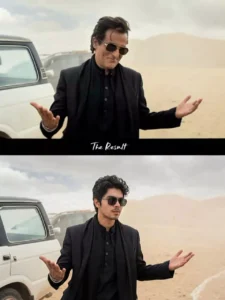
luxury SUV is parked behind him. The background is dusty with soft cloudy skies and muted beige tones. Cinematic lighting, shallow depth of field, realistic photography, 4K ultra-detailed, moody Bollywood movie scene, dramatic atmosphere, professional color grading.
PROMPT 2 :-Copy Prompt
A realistic selfie shot taken by a young man standing next to Bollywood actor Akshaye Khanna in a desert environment. Akshaye Khanna is on the left, looking serious, wearing a black blazer over a black kurta, a black scarf wrapped around his neck, and gold-rimmed aviator sunglasses. He has slightly messy, windblown dark hair. The young man on the right is wearing a grey t-shirt and glasses, smiling at the camera. The background is a behind-the-scenes movie set in a sandy desert, with film crew members, technical equipment, lights, and black SUVs parked in the distance. Bright natural daylight, harsh shadows, 4k resolution, candid smartphone photography style.
Video Prompt :-
Copy Prompt
“A cinematic slow-motion shot of a stylish man stepping out of a white SUV in a dusty desert location. As the car door opens, the man walks forward confidently with both arms slightly spread, wearing a black outfit and dark sunglasses. Light wind moves his hair while he smiles in a cool, composed way. The background is minimal with soft dust in the air, giving a dramatic movie-style entry. Camera follows him from a low angle, then shifts to a smooth front-tracking shot. Warm cinematic color grading, soft depth of field, high detail, ultra-realistic, hero-entry vibe.”
How To Use Dhurandhar Ai Photo Editing Prompts
Friends, creating images with Google Gemini is very easy. You just need to read these instructions carefully, and then you can easily create any image on your phone. Let me explain. First, copy any prompt, as we will use it to create our own image. Now, open Gemini. You can find it on the Play Store, or you can click on the “Create Your Image” button above to go to the Gemini website. Log in there. Now, paste the prompt into the box. Then, use the “+” icon to add an image that includes your face. Make sure the image only contains your face; if there are multiple faces, Gemini won’t give the correct result. So, add an image of your face. Now, click on the send button. You will have to wait a few moments. Your realistic image will be created, featuring you alongside someone like Ranveer Singh or Akshay Khanna, similar to the amazing AI images that are going viral.
How To Generate Your Video
Friends, to create a video from an image, we first need to know how to use it, because we can’t create a video without knowledge. Therefore, I’ll explain all the steps in this paragraph. Follow them, and your video will be easily edited. First, click on the “Create Your Video” button. You’ll be taken to the Flow AI website. The first thing you need to do is log in. You’ll see a “Project” option. Open it.
In the dashboard below, you’ll see “Text” and “Video” options. Click on “Frame” and “Video.” Here, you’ll find various options. From there, select “Frame” and “Video.” Now, select your image using the “+” icon. We’ll create a drone shot. Then, return to the website, copy the prompt, and use it to edit your image on the Flow Labs website. Click on “Generate” and your video will be ready in a few moments. Save it. In this way you can make a video of your Video With Hanuman Ji, it will look absolutely real.
Conclusion
The final result looks like you were standing right there on the set during their shooting time. You’ll see your own pictures in place of the popular heroes, heroines, or villains. The lighting and background match perfectly, making it look very realistic. That’s why it’s becoming so popular on Instagram. If you also want to create such pictures, you can easily do so by reading this article, because you won’t find anyone explaining it in such a simple way. We have explained it to you in the easiest possible way. We hope you liked this article and will share it.
Conclusion
According to me, this is how you can create your 15th August editing. In a very simple way so that if you like any other way by which you want to make a video, then you can ask for that too by commenting. We do not want any other such way which we want to leave. We do not want any such way. Due to which I cannot tell you good editing there.