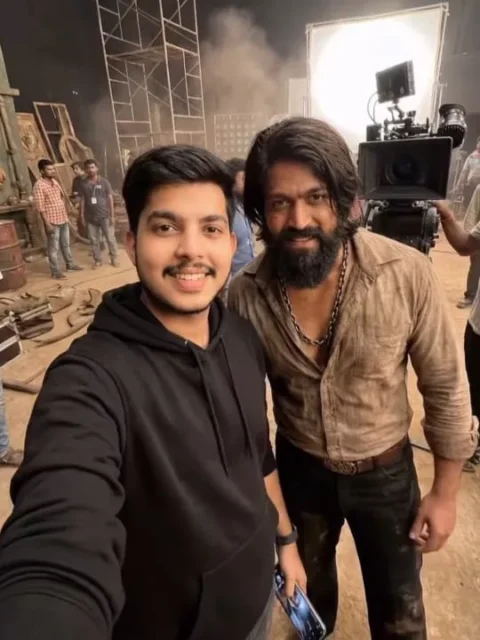
Hello friends, a warm welcome to our website! In this post, I’m going to show you how to create a unique and trending AI video. You may have come across that behind-the-scenes clip from a movie where a person appears to be taking selfies with various film heroes, even though he isn’t actually using his phone’s camera. He’s seen on the movie set, looking as if he’s clicking selfies with the main actor using his phone. This type of video is becoming viral everywhere.
If you haven’t made one yet, go ahead and create it quickly! In this article, I’ll guide you through the process of doing this AI video editing. Make sure to read the full article to get all the details. We will be doing this editing using an AI tool, and the video will be generated from photos. Now let me explain everything to you step by step.
Details Of Celebrity Selfie Ai Video Editing
Let’s now discuss the details of how this video editing works. This concept uses behind-the-scenes clips from different movie sets. In these videos, it appears as though we are visiting various sets and taking selfies with multiple actors. The footage shows us holding a phone camera, as if we’re recording a vlog while exploring different film locations such as Dhurandhar, Dangal, Baahubali, PK, or KGF Chapter 2. We look like we’re clicking selfies with the lead actors of these films and then shifting to another movie set. This entire video is produced using AI, and you can easily create this type of movie‑set style edit yourself. All we need is to follow the correct steps. If you want to make this edit, I’ll explain exactly how to do it. Make sure to read the article carefully; the prompt has been provided below the image. First, copy that prompt and generate your image using Gemini. After that, we will turn that image into a video. I will walk you through the complete process. Continue reading the next paragraph.
How To Create Image First
To create a standing video, the first thing we need to do is generate an image of ourselves. We need to create an image similar to those behind-the-scenes photos taken on movie sets, where people take selfies with actors. To do this, I’ll show you how. First, copy the prompt provided below the image. Open Google, paste the prompt there, and click on the plus icon. Now, add a selfie of yourself and a photo of the actor, and then send it. Chimney will then generate a realistic image for you, one that looks like it was taken on a movie set, showing you taking a selfie with the actor. Use this method to create three or four images, which we will then convert into a video. I will explain how to create the video in the following paragraph. Please read that first, and then you can generate your video.
Note: Some CapCut templates may not open in certain regions due to the app’s own restrictions. If the template button doesn’t respond, please try again later or open it directly from the official CapCut app. This external link opens the original CapCut template in a new tab. We are not affiliated with CapCut; all rights belong to their respective owners, and we only provide links for user convenience.
IMAGE PROMPT :-Copy Prompt
"Create an ultra-wide, cinematic selfie-style image in vertical 9:16 format.
IMPORTANT: Use the uploaded reference images exactly as they are. Do not change outfits, facial features, hairstyle, body type, or appearance in any way.
Uploaded Image 1: This is me (myself).
The character must look exactly identical to the uploaded image same face, same outfit, same hairstyle, no alterations.
I am holding the camera with my hand, taking a hand-held selfie.

Uploaded Image 2: The second uploaded character.
This character must also appear exactly as shown in the uploaded image, wearing the same outfit and look, with no costume or design changes.
Both characters are standing close together, naturally posing for a behind-the-scenes selfie.
The background is a large, wide, professional movie or series shooting studio, set during a daytime filming schedule.
The environment should clearly show a real film production day setup, including: professional cinema cameras mounted on tripods
camera rails / dolly tracks on the floor large studio lighting rigs, softboxes, LED panels
green screens, cables, monitors, reflectors crew members visible as silhouettes or blurred in the background
The studio should feel spacious, open, and big, like a high-budget movie set.
Lighting must be realistic studio daylight lighting, naturally illuminating both characters' faces and outfits.
The selfie should feel casual, candid, and behind-the-scenes, shot with a wide-angle smartphone lens, with slight edge distortion like a real selfie.
Ultra-realistic, high detail, sharp focus, cinematic color grading, professional movie set atmosphere."
VIDEO PROMPT :-Copy Prompt
selfie-style video, The camera stays in the same selfie position throughout, The person remains the same and walks to another scene smoothly, It should feel like one continuous shot where the person walks forward into a new location and ends by taking a selfie in the final scene. no talking, no lip movement, mouth closed
How To Generate Video
So friends, to edit this trending video, we will need an AI tool created by Google. Its name is Google Flow AI. And we will be using this tool to generate our video. So let me tell you the steps; you can follow them to complete your video editing. First, you need to copy the given video prompt. The image you want to use is also provided in the prompt; copy that as well, and then click on the “Generate Your Video” button. This button will take you directly to the official Google Flow website.
Now, we will generate our video here. First, click on the “New Project” option to create a new project. Then, in the dashboard, you will see the “Text to Video” option; click on it and select “Frame to Video.” Then, add your image using the plus icon and paste the prompt. After that, click on the “Send” button and wait for a while. Your video will start generating, and then an AI-generated video will be ready, just like the one you saw on social media. It will feature your face and will be created from your photo. This is how you can create this trending video. Now all the video clips have been generated. We can now open any video editing application, add all these clips together, and combine them into a single complete video.
Conclusion
Friends, this is how you can generate office-style videos, which are essentially behind-the-scenes video edits of movies. People are really enjoying doing this and showing a lot of interest in it. So, if you try it, your video has a higher chance of going viral. People will start asking you, “How did you do this editing?” I hope you liked the method I explained. If you liked the article, please share it so that others who want to do this kind of video editing can also create their own videos. For more new and trending video editing techniques, visit our website. You’ll find new content here, all based on current trends.