Trending Leaf AI Video Editing – These days, new AI video trends are popping up constantly, and people are creating and sharing them, making them go viral. One of the most popular trends right now is the “Leaf Sculpture” effect, where it looks like you’re being crafted from leaves in a highly realistic way—almost as if you’re weaving your own statue, similar to how baskets or mats are made.
If you want to create this trending video yourself, I’ll walk you through the entire editing process in this guide. The best part? You only need a single photo! First, we’ll generate an AI image from your selfie, and then we’ll transform that image into a stunning video.
Follow this step-by-step tutorial, and by the end, you’ll know exactly how to make your own viral Leaf AI video.
Let’s get started!
Details Of Trending Leaf Ai Video Editing
We’ll create this trending video using AI tools. The concept is simple: the video shows you sitting in a village setting, weaving a statue that looks exactly like you—just like villagers weave mats or baskets from leaves. The background is completely realistic, featuring thatched huts and a rural environment, making the video look authentic even though it’s AI-generated.
To make this, you’ll need two AI tools: Gemini and FlowAI, both developed by Google. These tools will help us generate the image and then turn it into a dynamic video. In the next section, I’ll explain the entire process step by step so you can easily create your own viral Leaf AI video.
How To Create Ai Image
To create the AI video, the first step is generating an AI image. This image will then be transformed into a video. Start by copying the prompt provided below the sample image and click on the “Create Your Image” button to open the Gemini website. Log in to Gemini, paste the prompt, and then click the plus (+) icon to upload your photo. For best results, make sure your photo has a clear, single face.
Once your image is uploaded, hit the “Send” button and wait a few moments. Gemini will generate an image of you as a statue made of leaves. Save this image because we’ll use it in the next step to create the video.
For the video creation process, we’ll use FlowAI. Read the next section to learn how to turn your AI image into a stunning, realistic video.
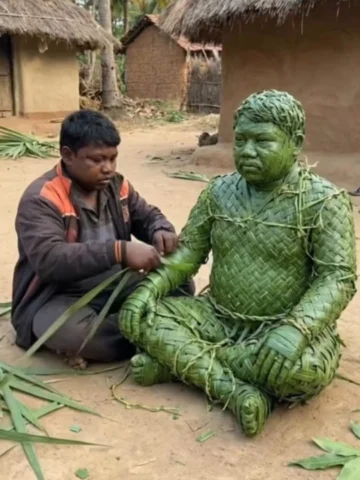
Image Prompt:-
Use the uploaded person as the only identity reference and show them twice in one frame — once as a real craftsman and once as a life-size seated sculpture made from fresh green leaves. Both must be an exact identity match (same face, age, hair, body, posture). The craftsman is on the right side, wearing the exact same clothes as the uploaded image, kneeling beside the sculpture and weaving leaf strips onto its upper body with a focused natural expression. The sculpture sits calmly on the ground, tightly woven with visible leaf veins and imperfections. Ultra-realistic documentary photo, vertical 9:16, eye-level medium shot, slight side-front angle, 35–40mm lens, natural daylight. Real rural village background with mud houses, thatched roofs, palm trees, earthy ground, scattered green leaves. Green-dominant, handcrafted look, photorealistic — not CGI or fantasy.
Note: Some CapCut templates may not open in certain regions due to the app’s own restrictions. If the template button doesn’t respond, please try again later or open it directly from the official CapCut app. This external link opens the original CapCut template in a new tab. We are not affiliated with CapCut; all rights belong to their respective owners, and we only provide links for user convenience.
Video Prompt:-
Documentary-style realistic animation in natural daylight. A person works continuously on a seated green-leaf sculpture with slow, natural human motion: gentle hand weaving, tightening fibers, adjusting leaf strips, subtle body shifts, slight head movement, focused expression. The sculpture remains completely static and unmoving at all times-no breathing, no leaf motion. Smooth, slow cinematic camera orbit (180°-360°) at eye level, constant distance. Subtle depth realism only. Clean environment. Realistic ambient sound. No fantasy cinematic effects.”
Generate Your Video
- Friends, making this kind of AI video is super easy. Just follow these steps:
- Finally, hit “Generate.”
- Click on “Generate Video” – This will take you straight to the Flow AI website.
- Log in using your email address.
- Create a Project – Select the “Create Project” option.
- On the dashboard, choose “Text”, then select “Frame” and “Video.”
- Click the “+” icon to upload an image, then enter text in the box provided below the image on my site.
- Copy the prompt I’ve shared in this article and paste it into the text box.
Conclusion
Friends, this is how you can create your own AI video of a statue being made. The entire process is completely free, and we can create it in just a few minutes. No one will be able to tell that it was created using AI. This level of detail is sufficient for this editing. I hope you understood and liked it. Please share it!