In the low glow of a high-end lounge, he sits with effortless authority, draped in shadow and velvet, power radiating without a word spoken. Gold glints against black silk as he leans back, relaxed yet untouchable, one arm claiming the sofa, the other calmly near the cheetah at his side. The animal’s presence is raw and electric—muscle coiled, mouth slightly open, chains heavy with weight and meaning—wildness not restrained, but understood. Sunglasses hide his eyes, yet command fills the room; this is not dominance through force, but through certainty. Man and cheetah exist in perfect balance—luxury and instinct, control and speed—captured in a moment where the world feels paused, watching power recognize itself.
Let’s get started!
Details Of a Cinematic Fashion edits of MAN & THE CHEETAH
This cinematic 16:9 edit is designed to project power, luxury, and controlled dominance while preserving 100 percent of the man’s exact facial identity from the reference image. The scene is set in a dimly lit, high-end lounge with rich ambient shadows and warm highlights that reflect subtly off gold accents and velvet textures. The man is seated confidently on a deep velvet sofa, his posture relaxed yet authoritative, leaning slightly toward a cheetah positioned beside him to establish a visual bond of dominance and mutual strength. He is styled in high-fashion dark attire, either a tailored black pinstripe suit or an open-collared black silk shirt, complemented by bold gold jewelry that reinforces a boss-like, gangster aesthetic. Dark designer sunglasses add mystery and elite status. One arm stretches casually across the back of the sofa, signaling control of the space, while the other hand rests calmly near the cheetah, emphasizing fearlessness. The cheetah wears heavy gold chains and holds a fierce yet composed expression, mouth slightly open, symbolizing raw power under command. The camera uses a slow wide-angle dolly-in from the front-left, enhancing cinematic depth, subject dominance, and storytelling impact, with dramatic lighting, shallow depth of field, and luxury color grading completing the high-end visual tone.
The best part?
You don’t need to edit anything manually.
The Ai handles all the cutouts and placements for you.
Create Your Image First
To create this cinematic fashion image of a man and horse, friends, the first step is to generate the base image using Google Gemini AI. For this, you need to copy the prompt provided below the image in the article. After copying it, click on the “Create Image” option, which will redirect you to the Google Gemini website. Log in to your Gemini account, then paste the copied prompt into the prompt box. Next, tap on the plus (+) icon to upload a reference photo if you want Gemini to follow a specific pose, outfit, or mood. Select your image, upload it, and then click on the “Send” button. After a few moments, Gemini will generate a high-quality, black-and-white cinematic fashion image based on your prompt. Once the image is generated, you can move on to the next step, where we refine the visual using AI editing tools to enhance contrast, film grain, depth, and overall cinematic quality, which I’ll explain in the next paragraph.
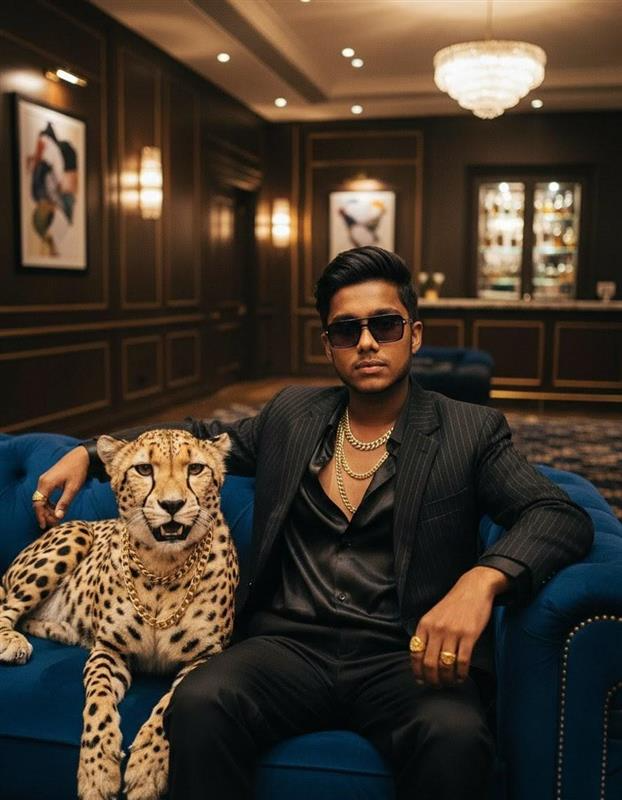
Image Prompt:-
Leopard- Create a cinematic 16:9 ratio photo using the uploaded man’s face as an exact reference (100% facial identity preserved).
The man is seated on a luxurious deep velvet sofa in a dimly lit, high-end lounge. His posture is relaxed yet commanding, leaning slightly toward a cheetah seated beside him.
He wears high-fashion dark attire — a sleek black pinstripe suit OR an open-collared black silk shirt, layered with bold gold jewelry. Dark designer sunglasses enhance his bossy, gangster aura.
One arm rests casually along the back of the sofa, while the other hand hovers calmly near the cheetah. The cheetah is adorned with heavy gold chains, mouth slightly open, showing a fierce but controlled expression.
Camera:
Slow wide-angle dolly-in from the front-left
Horizontal cinematic framing (16:9)
Note: Some CapCut templates may not open in certain regions due to the app’s own restrictions. If the template button doesn’t respond, please try again later or open it directly from the official CapCut app. This external link opens the original CapCut template in a new tab. We are not affiliated with CapCut; all rights belong to their respective owners, and we only provide links for user convenience.
Video Prompt:-
The man slowly turns his head toward the cheetah
His jaw tightens slightly, lips calm, confident
The cheetah breathes visibly, blinks, and shifts its head slightly
Lighting:
Low-key, moody lighting
Soft rim light outlining the man’s shoulders and face
Warm golden highlights reflecting off jewelry and velvet
Background:
Dimly lit luxury lounge
Velvet textures, dark wood panels
Subtle “NYSMAFIA” text visible in the background
Mood:
Raw dominance, calm authority, luxury, danger, cinematic realism
Style:
Ultra-realistic, 4K detail, shallow depth of field, cinematic color grading
To
Generate Your Video
Friends, now that the image has been created, the next step is to convert it into a video using Google Gemini. First, download and save the image you generated earlier. Then click on the “Generate Video” option, which will take you to the Google Gemini platform—you can use it on both desktop and mobile. After logging in to your Gemini account, go to the AI Video Generation or creative tools section. Upload the same image you created earlier, as using the original image helps maintain visual consistency and improves video quality. Next, add a motion or video prompt describing the movement you want, such as subtle body motion, wind moving the clothes, or cinematic camera movement. Gemini allows you to control style, motion, and mood through clear prompts, making the video look smooth and realistic. Once everything is set, click Generate, and after a short processing time, your AI-generated cinematic video will be ready. This method is ideal for creating trending AI videos, cinematic reels, fashion visuals, and short-form content using Google Gemini’s advanced AI capabilities.
Conclusion
In conclusion, creating a cinematic fashion image and video of a man and Cheetah has never been easier thanks to Google Gemini AI. By generating high-quality, black-and-white cinematic images and then transforming them into smooth, realistic videos, you can produce professional-grade content without expensive cameras or studios. Whether you are looking to create trending AI videos, fashion editorials, cinematic short clips, or social media-ready visuals, this method provides a simple and creative workflow that anyone can follow. With AI tools like Gemini, artists, photographers, and content creators can explore luxury fashion storytelling, fine-art photography, and high-end visual narratives while saving time and resources. Start experimenting today, and bring your avant-garde fashion concepts, cinematic portraits, and creative visual ideas to life with just a few clicks.