Trending Car AI Video Editing – Hello friends, welcome to our website! In today’s article, I’m going to show you a very unique and creative video editing style. If you spend time on social media, you must have come across this kind of editing, which has already gained billions of views. This type of video is made with the help of an AI tool, and amazingly, it only requires a single photo. When I noticed that the video had crossed 2 million likes, I was shocked to see how viral it had become. If you also want to make a video like this trending car video, then read this article till the end. I will walk you through the complete method of creating a video from just your photo using an AI tool. The entire process is simple and absolutely free. Go through the article, and you’ll understand everything clearly.
About Trending Car Ai Video EditingDetails Of Dhurandhar Ai Photo Editing Prompts
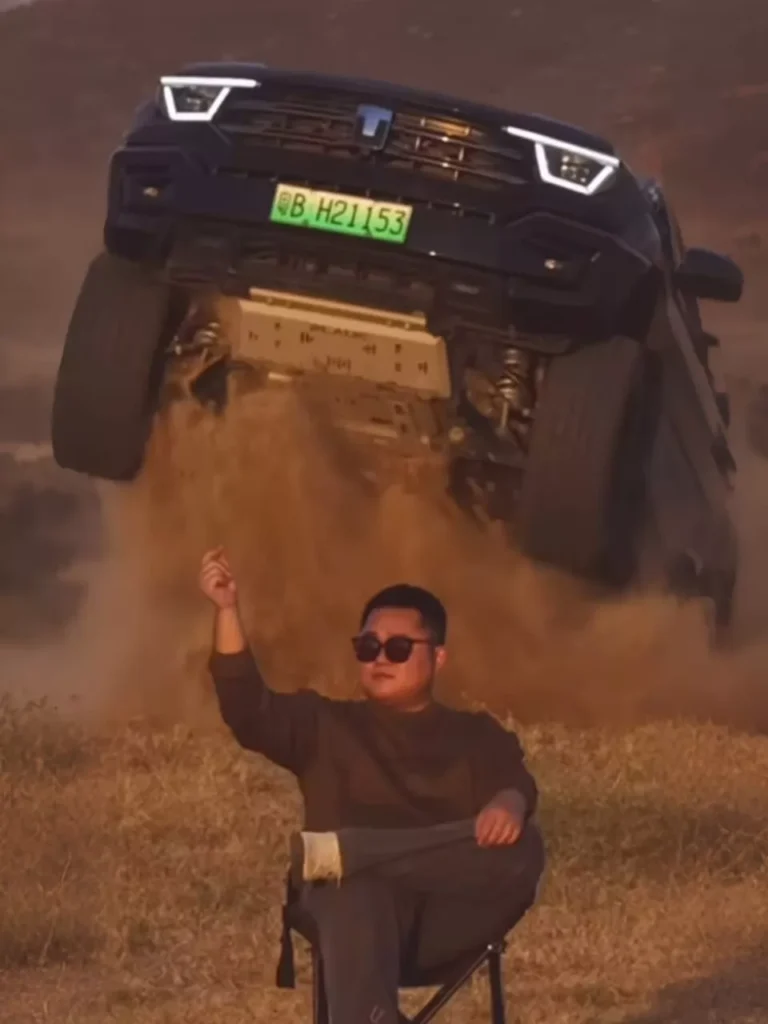
When we talk about this style of video editing, it features a man sitting on a chair while his video plays. Then, with just a snap of his fingers, a black SUV suddenly leaps in from behind, moves past him, and drives away — all while the man stays seated. This type of editing is so engaging that people can’t stop watching it, especially the moment when the car enters the scene. That moment looks incredible, and it’s the main reason the video went viral. We are also going to create this same kind of edit using AI, specifically through a tool called Flow AI. With the help of this tool, we’ll make our own viral-style video. I’ll explain the full process step by step — just keep reading.
Why This Editing Is Viral?
So friends, this video editing trend is becoming viral because it uses a highly creative concept, something no one had tried before. That’s why people are instantly drawn to it and keep sharing it, which is pushing the video to spread even more. When I came across it on Instagram Reels, it already had over 2.3 million likes — and the likes are still climbing. The moment the car enters the scene, the motion of the vehicle and the posture of the person inside look so natural, as if a real movie scene is being filmed. It gives the vibe of a hero or villain making a dramatic entry. But the surprising part is that this entire effect was produced from just one photo, processed using an AI tool. We’ll be using that same AI tool to make our own video as well. Many people have already started creating videos in this style, and if you also want to create such a video and go viral, then you must read this article. I’m now going to explain the steps you can follow to edit your own video.
Note: Certain CapCut templates might not work in some regions because of the app’s own limitations. If the template button doesn’t open, try again after some time or access it directly through the official CapCut app. This external link will take you to the original CapCut template in a new tab. We are not connected to CapCut in any way; all rights belong to their respective owners. We only share these links to make things easier for users.
Video Prompt :-
Copy Prompt
The person from the photo is positioned center frame, sitting calmly on a chair.
He looks confident and relaxed.
He gently raises his hand and makes a finger snap gesture in the air.
In the background, a natural sloped terrain / small hill is visible.
From behind that slope, a SUV car smoothly comes upward, as if driving over a ramp.
For a brief moment, the car is slightly airborne due to motion, then lands softly and smoothly.
The car continues moving forward and stops behind the seated person.
Everything looks controlled, realistic, and safe.
No damage, no destruction, no chaos.
Cinematic camera movement, smooth motion, natural lighting, high-quality realistic video.
How To Generate Your Video
So friends, to edit this trending video, we will need an AI tool created by Google. Its name is Google Flow AI. And we will be using this tool to generate our video. So let me tell you the steps; you can follow them to complete your video editing. First, you need to copy the given video prompt. The image you want to use is also provided in the prompt; copy that as well, and then click on the “Generate Your Video” button. This button will take you directly to the official Google Flow website.
Now, we will generate our video here. First, click on the “New Project” option to create a new project. Then, in the dashboard, you will see the “Text to Video” option; click on it and select “Frame to Video.” Then, add your image using the plus icon and paste the prompt. After that, click on the “Send” button and wait for a while. Your video will start generating, and then an AI-generated video will be ready, just like the one you saw on social media. It will feature your face and will be created from your photo. This is how you can create this trending video.
Final Words
So friends, this is how you can create trending video edits using your own photos, and this tool will make your video look just like those trending videos. I’ve also explained the process to you, and I hope you understood everything. I hope you liked this article. If you want to create and edit more videos on new trending topics, then visit our website. Here you will find tutorials on new trending videos, which will help you learn editing and create your own videos. If you liked the article and my explanation, please share it.