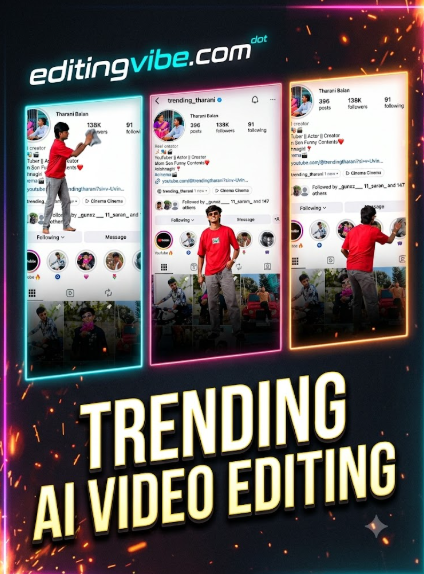
Diwali AI video editing 2026 is one of the most fun festive reel ideas right now. A tiny version of you climbs out of your profile picture, cleans your profile, hangs marigold garlands, lights diyas, and does aarti. You only need one photo, one profile screenshot, and a few prompts. No editing skill is needed.
What Is This Diwali AI Video Trend?
It is a short Diwali AI-made story reel. Your Instagram profile screenshot works as a giant wall in the background. A miniature you moves around in front of it and decorates it for Diwali. The AI creates the images and the motion. You join the clips and add music.
Why Is It Popular?
- It tells a small story, so people watch till the end.
- The miniature-you idea is new and easy to recognise.
- It fits festival season, when everyone wants fresh reel ideas.
- Friends and family share it because it features a real person.
- It works on a phone with no studio setup.
What You Need
- One sharp photo of you, with your full face and outfit visible
- A screenshot of your own Instagram profile
- An AI image tool, such as Gemini or ChatGPT
- An AI image-to-video tool, such as Google Flow
- CapCut or another editor for joining clips and adding music
- The four prompts below
- Diwali AI Video
Tool names, free limits, and features can change by region and plan. Check inside each app. For Diwali AI Video Edit
Prompt 1: Image Prompt (Original)
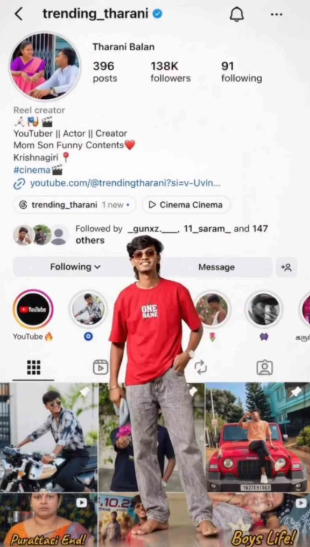
Upload your photo and your profile screenshot, then paste this.
Add a standing miniature of me in front of the profile in the middle. Face intact and remove my profile pic on the background
Prompt 2: Image Prompt (Original)
Use the image from Prompt 1 as the reference, then paste this.
CHANGE THE POSE IN THIS PHOTO HE SHOULD BE HOLDING AN WHITE "PUMPKIN IN HIS HAND WITH A TINY BURNING CAMPHOR ON TOP OF IT. ALSO ADD GARLAND DECORATIONS CROSS THE PROFILE IN BACKGROUND BASICALLY I AM TRYING TO CREATE AN AYUTHA POOJA SET UPPrompt 3: Video Prompt (Original)
Upload the Prompt 1 image to your image-to-video tool, then paste this.
A miniature version of me climbs down from profile pic and wipes off and cleans the profile usina cloth. Seamless movements. Clean whole of the profile pic in the backaround.
Prompt 4: Video Prompt (Original)
Upload the Prompt 2 image, then paste this.
He decorates the profile in background and decorates the floor with garlands the picks up a pumpkin and perform aartiStep-by-Step: How to Make It
- Pick a clear photo where your full face and outfit are visible.
- Take a screenshot of your own Instagram profile.
- Open Gemini or ChatGPT and upload both images.
- Paste Prompt 1 and generate the first image.
- Use that image as the reference, paste Prompt 2, and generate the second image.
- Open Google Flow or another image-to-video tool.
- Upload the first image, paste Prompt 3, and generate the first clip.
- Upload the second image, paste Prompt 4, and generate the second clip.
- Download both clips.
- Open CapCut and place the clips one after the other.
- Add festive music from the app’s own library and trim the clips to match the beat.
- Apply light colour grading, export in 9:16, and upload.
Tips for the Best Result
- Use a sharp photo. The AI copies what it sees.
- Keep each prompt to one idea. Short, clear prompts are easier for the AI to follow.
- Generate two or three versions of each clip and pick the cleanest.
- Check faces, hands, and the profile text before you export.
- Add a short caption on screen, such as a Diwali greeting.
- Trim any odd frames at the start or end of each clip.
Common Mistakes to Avoid
- Using a blurry or cropped photo
- Writing one long prompt with many actions
- Skipping the line that says to keep the face unchanged
- Uploading someone else’s profile screenshot without permission
- Posting the first result without watching it fully
- Using music your platform does not allow for your account
Key Takeaways
- One photo and one profile screenshot are enough to start.
- Four prompts cover the images and the clips.
- Simple prompts give cleaner motion.
- Always check the result before posting.
- Use only your own photos, or ones you have permission to use.
Conclusion
Diwali AI video editing 2026 is easy once you have the flow: two images, two clips, one edit. Start with the prompts above and change the details, such as the outfit, the decorations, or the final pose. Try two or three generations and post the best one.
Disclaimer: This website is not affiliated with Google, Gemini, Google Flow, ChatGPT, CapCut, or Instagram. All trademarks belong to their respective owners. Results vary by tool, plan, and photo quality. Use photos, screenshots, and music only with permission.
1. What is Diwali AI video editing 2026?
It means using AI tools to turn a photo into a short Diwali-themed video, such as a miniature you decorating your profile.
2. Do I need editing skills?
No. You paste prompts and join two clips in an app like CapCut.
3. Which tools can I use?
Gemini or ChatGPT for images, and Google Flow or any image-to-video tool for clips. Features depend on your account.
4. Why does my face change in the video?
The photo may be unclear, or the prompt may be too complex. Use a sharper photo and keep the “same face” line.
5. Can I make this on my phone?
Yes, if the tools you pick have mobile apps or work in a mobile browser.